
Cloud Intelligence™ data source for Grafana
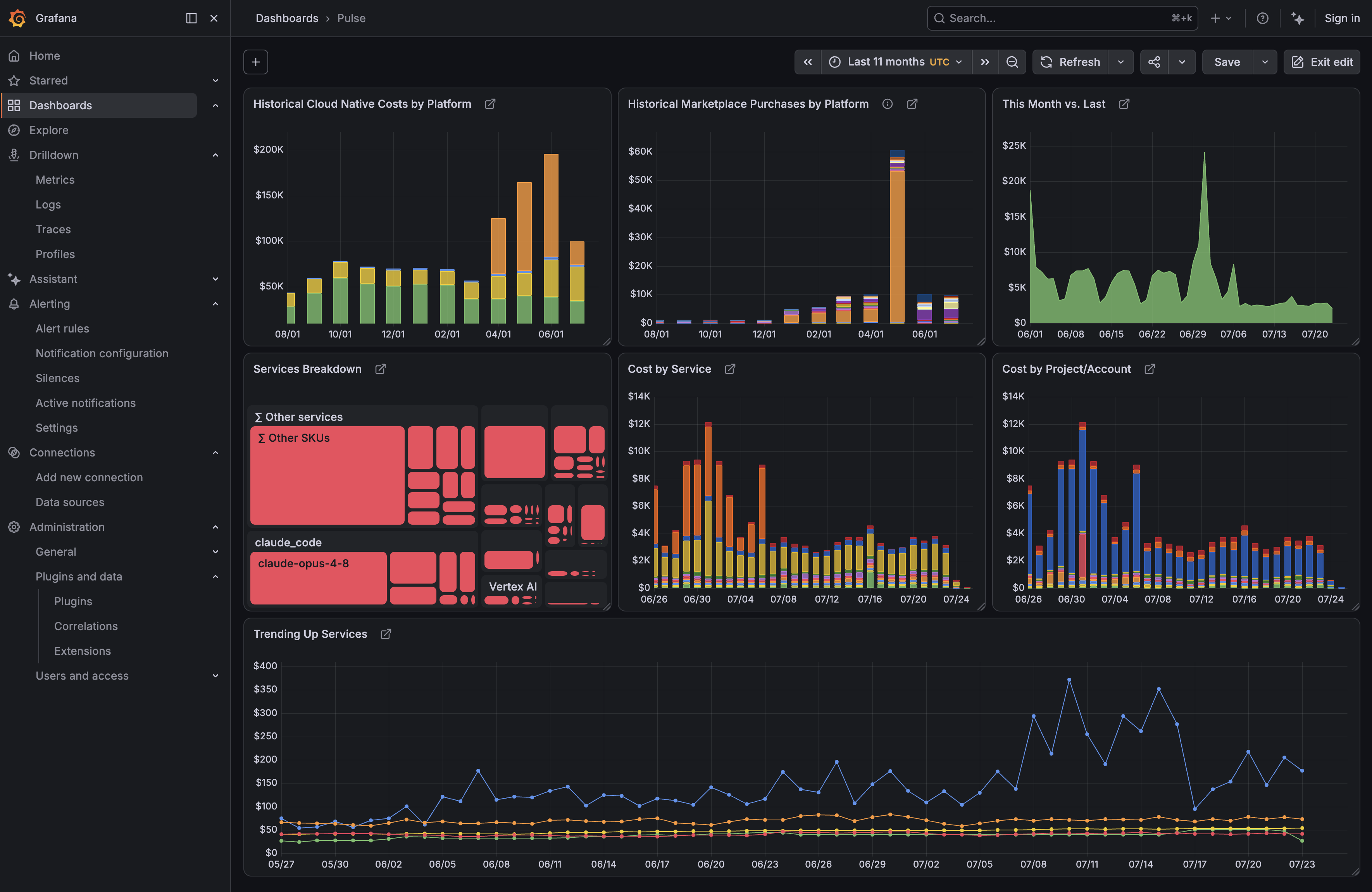
Visualize your multicloud cost analytics from Cloud Intelligence™ directly in Grafana. The plugin queries the DoiT API directly, with no data export or sync required, across AWS, Google Cloud, Azure, Oracle Cloud and over 40 additional integrations.
Features
- Saved reports: Run any Cloud Analytics report from your DoiT Console and render its results as Grafana time series, tables, or treemaps.
- Ad-hoc queries: Build cost queries in Grafana — pick a metric (cost, usage, or savings), a time interval, and the dimensions to group by (service, project, SKU, labels, …), without creating a report in the DoiT Console first.
- Grafana time range: Report queries can follow the dashboard time picker instead of the report's own time settings.
- Alerting: The data source supports Grafana Alerting; build alert rules on top of any report or ad-hoc query.
- Dashboard export from DoiT Console: The DoiT Console can generate ready-made Grafana dashboard JSON from any Cloud Analytics dashboard or report for use with this data source.
Requirements
- Grafana 12.3.0 or later.
- A Cloud Intelligence™ account and a DoiT API key with Cloud Analytics access.
- The Grafana Treemap panel plugin for exported dashboards that contain treemap reports.
Configuration
In Grafana, go to Connections → Data sources → Add new data source and select DoiT Cloud Intelligence.
Set the following options:
Option Description API URL DoiT API base URL. Defaults to https://api.doit.com.API Key Your DoiT API key (stored encrypted via Grafana secure JSON data). Click Save & test. The health check verifies connectivity and the API key.
To generate an API key, see the DoiT API documentation.
Provisioning example
apiVersion: 1

datasources:
  - name: DoiT Cloud Intelligence
    type: doitintl-doitcloudintelligence-datasource
    access: proxy
    jsonData:
      apiUrl: https://api.doit.com
    secureJsonData:
      apiKey: $DOIT_API_KEY
Usage
Query a saved report
- Add a panel and choose the DoiT Cloud Intelligence data source.
- Set Query type to Saved report.
- Select a report from the Report drop-down (populated from your DoiT account).
- Leave Use dashboard time enabled to override the report's time settings with the dashboard time picker, or disable it to use the time range saved in the report.
Ad-hoc query
- Set Query type to Ad-hoc query.
- Choose a Metric (cost, usage, or savings) and a Time interval (hour, day, week, or month).
- Select one or more Group by dimensions (populated from your DoiT account).
Ad-hoc queries total the selected metric over the last 30 days; they do not follow the dashboard time picker. The query editor has no controls for filters or other aggregations. To filter or aggregate differently, create a report in the DoiT Console and query it as a saved report. Ad-hoc queries whose JSON already contains filters or aggregation settings (for example in a provisioned dashboard) are run as configured.
Results are returned as time series frames (one series per group) suitable for time series, bar chart, and stat panels, or as a table for tabular reports. Treemap panels exported by DoiT Console receive a hierarchy frame compatible with the Grafana Treemap panel plugin.
Successful saved-report and ad-hoc query results are cached for six hours per data source instance. Dashboard data can therefore be up to six hours old. API queries run one at a time per data source instance to avoid upstream throttling; additional panel queries wait for the active query to finish. Timed-out queries are not cached; try a shorter time range.
Alerting
The data source supports Grafana Alerting. Create an alert rule, choose this data source in the query, and add expressions (reduce, threshold) as usual.
Getting help
- Open an issue for bugs or feature requests.
- DoiT API reference for the underlying Cloud Analytics API.
Development
See CONTRIBUTING.md for local development, build, and test instructions.
License
Grafana Cloud
Connect any plugin in Grafana Cloud.
- 150+ data source integrations
- Grafana Assistant - AI that correlates your data, builds queries, and answers questions
- 10k Prometheus metrics + 50 GB logs, traces, and profiles on the free tier
- ...and more
Insights
- Adoption
Running on 30 active Grafana instances.
- Activity
Last updated 7 Oct 2026.
1 release in the past year.
- Queries
72 total queries served across all Grafana Cloud instances.
- Version
- 1.1.4
- Dependencies
- Grafana >=12.3.0
- Developer
- Cloud Intelligence
Grafana Cloud
Connect any plugin in Grafana Cloud.
- 150+ data source integrations
- Grafana Assistant - AI that correlates your data, builds queries, and answers questions
- 10k Prometheus metrics + 50 GB logs, traces, and profiles on the free tier
- ...and more